
 App Store
 GeoSpoof vs GeoCeptor: Real-World Testing & In-Depth Feature Comparison
When looking for location spoofing on macOS and iOS, GeoSpoof and GeoCeptor are two of the most prominent solutions. Both provide Safari location controls, and both now offer an optional Mac companion path for device-level iPhone and iPad location simulation. Their browser coverage, privacy features, pricing, and companion workflows differ, so this article separates the documented product capabilities from the leak behavior observed in our browser tests.
Feature & Pricing Breakdown
| Capability / Pricing | GeoCeptor | GeoSpoof |
|---|---|---|
| Free Features | Safari location, Custom Timezone & Locale | Safari location, timezone & WebRTC |
| Lifetime / One-Time Price | $13.99 | $24.99 |
| Yearly Subscription | $6.99 | $9.99 |
| Monthly Subscription | N/A (Focus on value) | $1.99 |
| HTML5 Geolocation Spoofing (Safari) | Yes | Yes |
| Sandboxed Iframe Timezone Spoofing | Yes (Fully masked) | Mismatch observed in tested build |
| Canvas Anti-fingerprinting | Yes (Mathematical noise injection) | No |
| Hardware Concurrency Cloaking | Yes | No |
| WebRTC Leak Blocker | Yes | Yes |
| Device GPS + macOS Companion | Yes (Free download + Pro sub) | Yes (GeoSpoof GPS + Pro) |
1. The Architecture: Built for Safari and Apple Platforms
Both products provide Safari controls on Apple platforms. GeoSpoof also offers GeoSpoof GPS, an optional device-level feature driven by a Mac companion; GeoCeptor provides its own GeoCeptor Companion workflow for native iPhone and iPad apps. Unlike Chrome extensions that use standard WebExtensions APIs, Safari extensions require tight integration with Apple's AppKit and UIKit ecosystems.
GeoCeptor was engineered from day one to operate exclusively as a native Safari extension on macOS and iOS. This means zero unnecessary background processes, minimal battery drain, and native system-level theme integration.
2. Anti-Detection & Leak Testing
Modern tracking networks, fraud detection engines, and streaming verification systems don't just ask for your location; they also test isolated execution contexts. In the browser test documented below, GeoSpoof's Safari controls exposed a timezone mismatch in an isolated frame while GeoCeptor kept the tested signals aligned.
We tested both extensions against a battery of browser diagnostic suites (including our own open diagnostic at /check).
The Timezone Leak in GeoSpoof
In our test, when a website embeds a sandboxed <iframe> or creates an isolated execution realm, GeoSpoof did not propagate the virtual timezone into that frame. JavaScript executing there read the device's actual hardware timezone, creating a mismatch with the top-level page. Treat this as a result for the tested build, not a claim about every current GeoSpoof release.
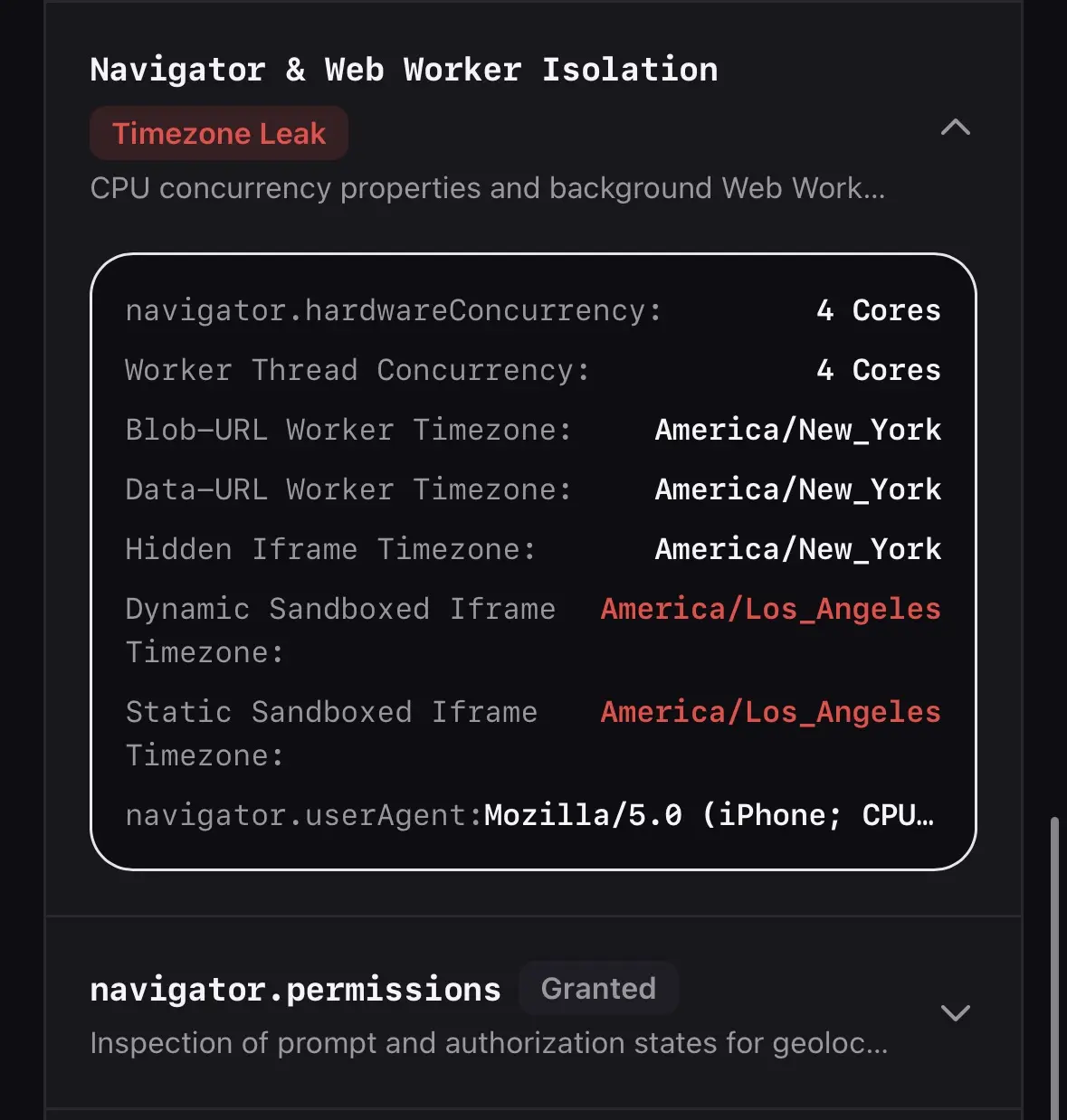
GeoCeptor kept this test aligned: its script injection hook intercepts at the WebKit world level before sub-frame scripts evaluate, so the tested iframe, popup, and worker contexts inherit the same spoofed timezone and locale parameters.
Canvas 2D Fingerprinting
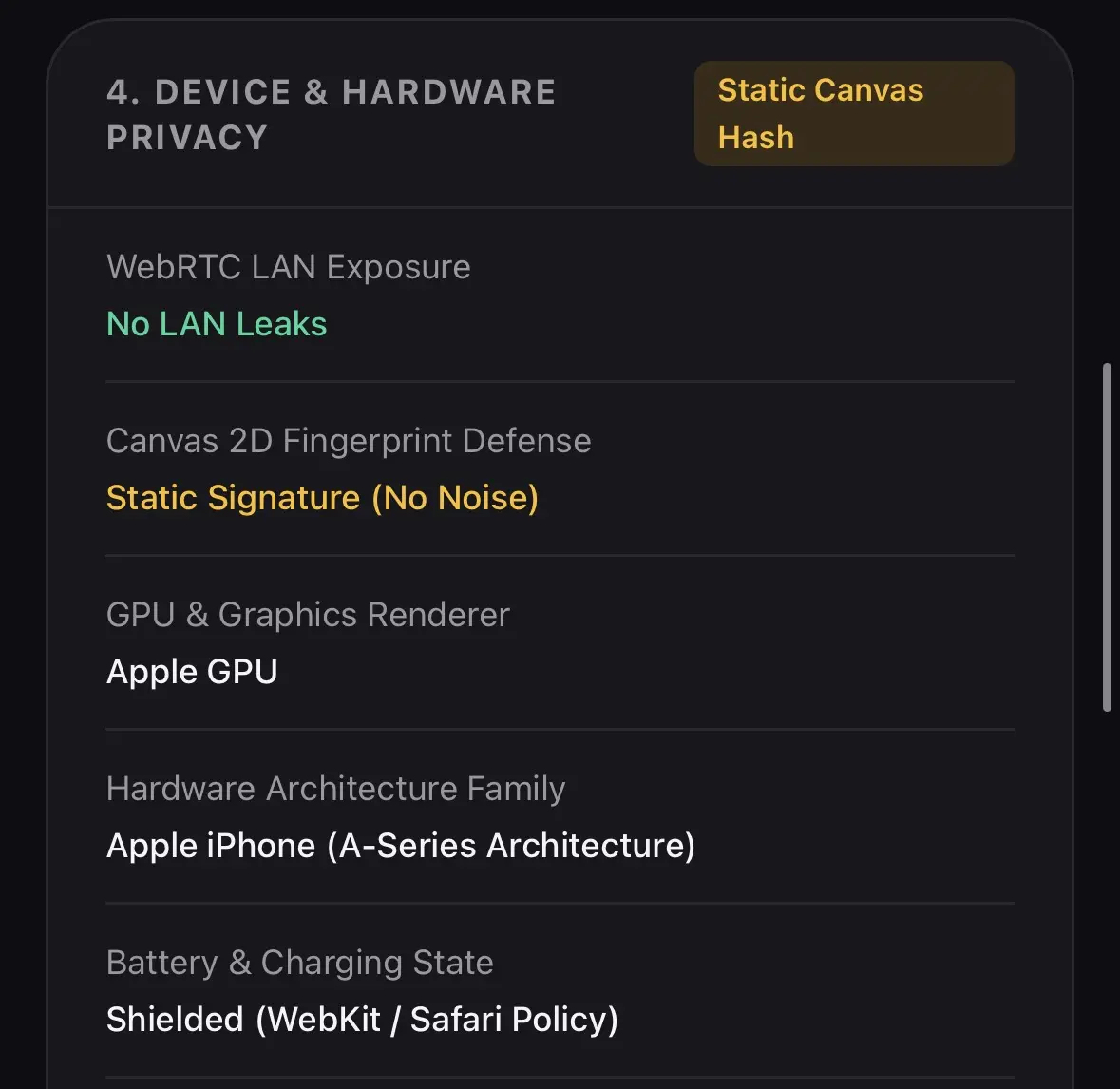
Changing your GPS and IP address isn't enough if a tracking script can identify your GPU. Canvas fingerprinting draws invisible text and geometric paths onto an HTML5 canvas element; the sub-pixel rendering quirks of your graphics card produce a unique hash.
GeoSpoof lists anti-fingerprinting as a product feature, but its public materials do not describe the same Canvas 2D noise mechanism. GeoCeptor includes an active Canvas Noise Generator that subtly alters pixel data values in a way that is invisible to the human eye while changing the resulting fingerprint hash.
3. Pricing & Business Model
Privacy tools should have transparent, accessible pricing. A direct look at the App Store in-app purchases reveals the difference:
- • Free core features included forever
- • $6.99/year or $13.99 one-time lifetime
- • Family Sharing enabled
- • Includes all advanced anti-fingerprint layers
- • Limited free trial period
- • $9.99/year or $24.99 one-time lifetime
- • Additional charges for monthly tiers
- • Browser controls plus optional device GPS through its Mac companion
4. Summary: Which Should You Choose?
Choose GeoSpoof if:
- You want GeoSpoof's browser controls or its optional GeoSpoof GPS Mac companion.
- You prefer its VPN sync, filters, widgets, or other product-specific workflow.
- You are comfortable with higher lifetime pricing ($24.99).
Choose GeoCeptor if:
- You want a robust anti-fingerprinting stack (Canvas 2D noise injection + Hardware Concurrency cloaking).
- You primarily browse in Safari on iPhone, iPad, or Mac.
- You want native location spoofing and timezone/locale controls for free.
- You prefer a more affordable, fairly priced premium tier for advanced tracking protection.